
Renewal templates are a Primary template plus one drip template per step in your renewal sequence. The sequence defaults to four steps (12, 7, 3, and 1 months to maturity), but you set which months exist in Settings > Outreach Settings, under the renewal auto outreach toggle: add or remove month steps, each anywhere from 1 to 24 months before maturity.
Where To Edit
- Go to Settings > Templates.
- Leave the top toggle on Your Templates.
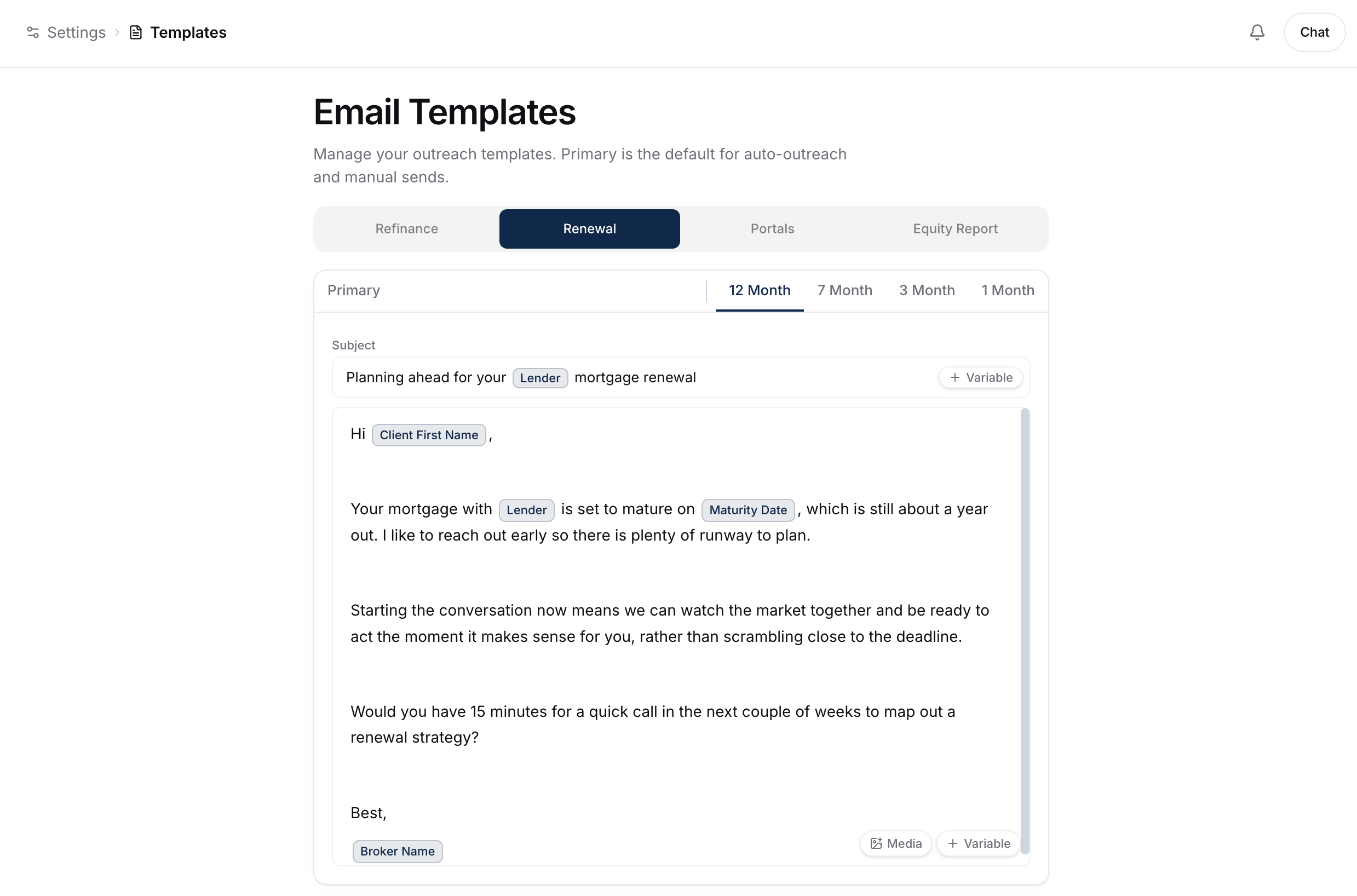
- Select the Renewal tab.
You'll see your Primary template plus one editor per step in your sequence. With the defaults that's tabs for 12 Month, 7 Month, 3 Month, and 1 Month.
Your Templates And Shared Templates
The toggle at the top of the page switches between two sets:
- Your Templates - personal to you. Every user gets their own copy, and your personal Primary is the default everywhere. This is where you'll do most editing.
- Shared Templates - visible to your whole brokerage. Anyone on the team can use or edit them.
Shared Templates (and the Share with team option) only appear when at least two people on your team have email sending permissions. Solo brokers, and teams where only one member can send, see just their personal templates.
To publish one of yours to the team, open its ⋮ menu on the tab and choose Share with team. That copies it into Shared Templates and leaves your personal original untouched. The copy is named after you (for example "Mandric's Primary"). Sharing a template that has a drip sequence shares the whole family together - the initial renewal email plus each step template.
What Each Template Is For
- Primary - the default template, used for one-off manual renewal sends (when you send to a single client immediately instead of the drip).
- Each step template is the auto outreach drip email sent at that many months to maturity, in sequence order.
When you add a brand-new step (say a 13-month step), its editor comes pre-filled with an editable default email using the standard variables, so you never start from a blank box. Edit it down to your voice or send it as-is.
The drip stops the moment a client replies, regardless of which step they're at. See How Renewal Auto Outreach Works (The Drip).
Tone By Step
Tune the tone for the timeline (using the default steps as an example):
- 12 month - soft, "let's start the conversation."
- 7 month - sharper, "now's the time most banks are opening their renewal offers."
- 3 month - urgent, "decision window."
- 1 month - final, "let's get this booked."
Available Merge Variables
Same as the refinance templates:
{{client_first_name}},{{client_full_name}}{{current_rate}},{{best_rate}}{{maturity_date}},{{months_to_maturity}}{{property_address}}{{broker_first_name}}
Inserting Images And Videos
Every email body editor (the Primary template and each step) has a Media button next to the Variable button, bottom-right of the body field. It opens an Insert media picker where you can upload an image (PNG, JPEG, WebP, or GIF, under 10MB) or paste a YouTube, Vimeo, Loom, Instagram, or Facebook link.
A pasted video link becomes a clickable thumbnail with a play button - clicking it in the sent email opens the video. Recipients whose email app shows plain text get a "Watch:" line with the link instead. Instagram and Facebook links show a branded preview card instead of the post's own image (Meta doesn't make that thumbnail available), and clicking it still opens the post. In the editor, inserted media shows as a small chip; the real image or thumbnail appears in the sent email.
Uploads go to a shared library for your brokerage, so you can reuse them across templates. Hover a library item to delete it - if you delete something that's still placed in a template, it's simply left out of sent emails. Media is available in email bodies only, not subject lines, SMS templates, or portal templates.
Adding A Hyperlink
Select the words you want clients to click, then choose the Link icon from the formatting toolbar that appears. Enter the destination URL and confirm it. The linked words stay clickable after the template saves and in the email your client receives.
Use the full URL, such as https://app.getbrokerplus.ca, when you have it. A website address without https:// also works and is sent as a secure https:// link.
Variants
You can save multiple variants of the Primary template (for the one-off manual sends). The step templates each have one body.
Previewing
Click Preview to see the rendered email with sample data. Your edits save on their own as you type - a Saved note appears at the bottom of the screen once they're recorded, so there's no Save button to click.
What To Do Next
- Send a one-off renewal: Sending A Renewal Email.
- Wire them up to the drip: How Renewal Auto Outreach Works (The Drip).
- The refinance templates work the same way: Editing The IRD Email Template.