
We ship 11 default templates out of the box, each tuned for a different deal scenario. They're designed to give you a starting point - you can use them as-is or duplicate and edit to match your style.
To find them, open the Client Portals page and click Edit Portals. The modal opens with a toggle at the top: Templates and Add-on packs. The default templates live on the Templates tab.
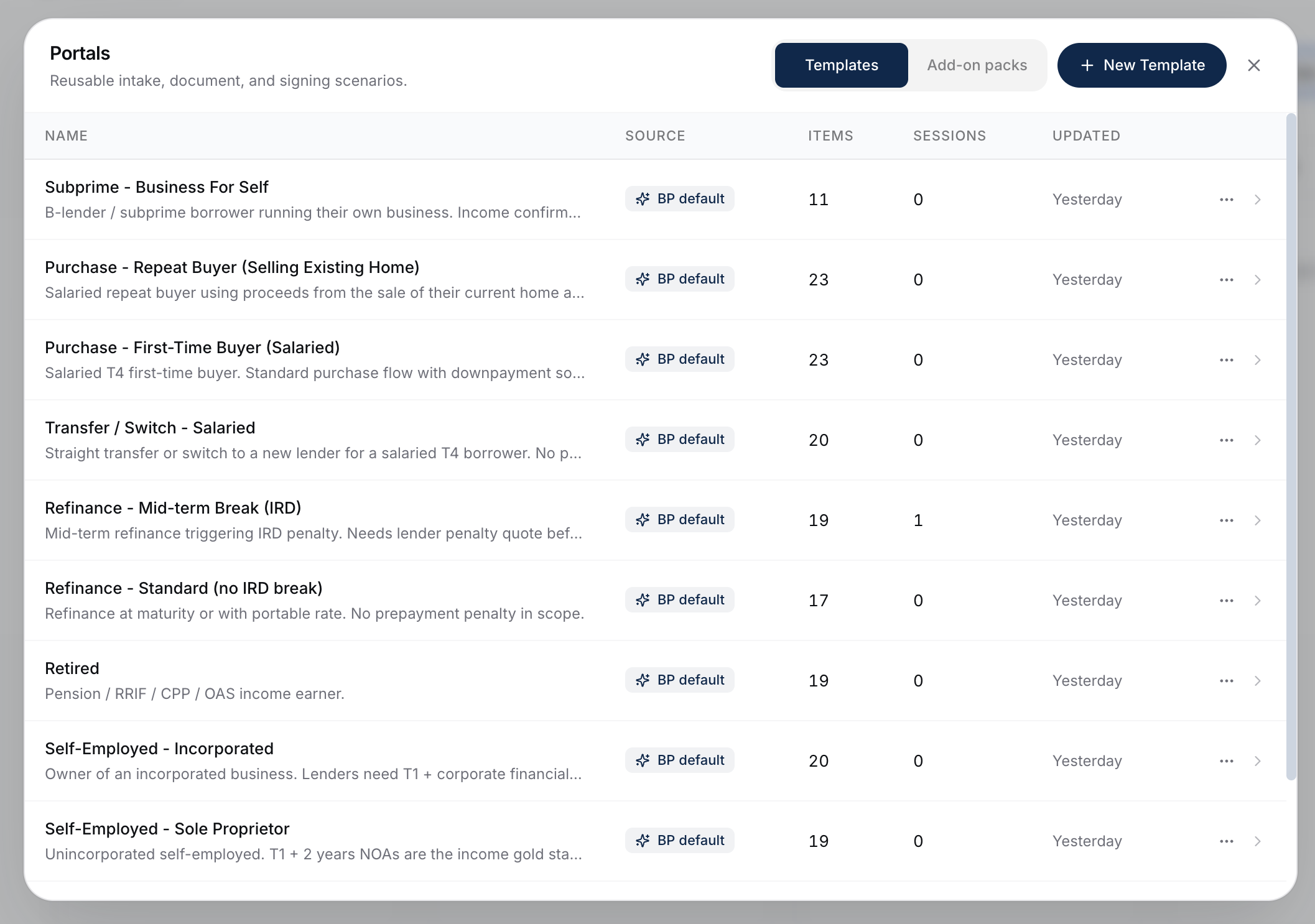
Each default is an editable copy you own. You can tweak a default before sending it, duplicate it into a new one, or build your own from scratch - the seeded versions are yours to change.
Default Add-on Packs
BrokerPlus also seeds a set of default add-on packs, found on the Add-on packs tab of the same Edit Portals modal. Add-on packs are reusable document bundles - things like gift-from-abroad documents or lawyer info - that layer additively onto a template at send time. They're editable the same way as templates: adjust a seeded pack, duplicate it, or create your own.
The Full List
Pre-Approval
- Employed Pre-Approval - Salaried T4 employee pursuing a pre-approval. Standard CMHC-conforming flow.
Employment Scenarios
- Employed - Commission Income - Salaried + commission earner. Lenders need a 2-year average for commission portion.
- Self-Employed - Sole Proprietor - Unincorporated self-employed. T1 + 2 years NOAs are the income gold standard.
- Self-Employed - Incorporated - Self-employed with a corporation. Different income docs vs sole prop.
- Retired - Pension and investment income.
Refinance
- Refinance - Standard (no IRD break) - Refinance at end of term or open mortgage. No penalty.
- Refinance - Mid-term Break (IRD) - Refinance mid-term where an IRD penalty applies.
Switch / Transfer
- Transfer / Switch - Salaried - Switching lenders at renewal as a salaried employee.
Purchase
- Purchase - First-Time Buyer (Salaried) - First-time buyer flow with HBP, FHSA, etc.
- Purchase - Repeat Buyer (Selling Existing Home) - Repeat buyer selling their existing property.
Specialty
- Subprime - Business For Self - Subprime/alternative lending scenario for self-employed borrowers.
Full Intake Vs Docs-Only
Most defaults are full intake templates (they collect both forms and docs). Some scenarios - especially follow-up document collection mid-deal - are better served by a docs-only variant. You can create your own if the defaults don't cover your needs.
Picking The Right Template
A simple heuristic:
- Start with the income scenario (Employed / Self-Employed / Retired).
- Adjust for the deal type (Refinance vs Purchase vs Transfer).
- Layer on addon packs for specific situations the default doesn't cover (gift down payment, rental income, newcomer, etc.).
Editing A Default Before Sending
You can adjust the template at send time - add custom conditions, attach add-on packs, or remove sections that don't apply. See Sending A Portal.
For permanent edits to a template (or to create your own from scratch), click Edit Portals on the Client Portals page, stay on the Templates tab, and open the one you want. See Creating And Editing Your Own Portal Templates.
Single Vs Joint Applications
Each question carries a "show on" setting - single application, joint application, or both. Most questions are set to both, so they appear no matter how many applicants are on the deal. A joint application (one with co-applicants) adds a per-applicant "your share of the down payment" question, which sits directly under the total down payment amount and asks each applicant how much of it they are personally providing. It only shows on joint applications. You can change any question's "show on" setting when you edit a template.
What To Do Next
- Build your own template: Creating And Editing Your Own Portal Templates.
- Layer addon packs for scenario coverage: Addon Packs.